Teleprompter Apps for Rehearsing Speeches
Voice-activated scrolling surfaces the exact sentences that need rewriting.
A speech breaks down in one of two ways. Memory failure: you lose the thread and start reconstructing it out loud while the audience watches. Or eye-line drift, which is subtler and more damaging. Every time a speaker glances down at a phone or a script, credibility bleeds out of the room. Research on nonverbal communication suggests that sustained eye contact signals competence, and its absence can read as uncertainty, regardless of how well-crafted the words actually are.
Teleprompter apps address both failure modes. Pacing control, hands-free delivery, eye contact preservation. But the rehearsal value is more interesting than the mechanics suggest.
Voice-activated scrolling, the kind PromptSmart executes through its VoiceTrack technology, works as a diagnostic instrument. The scroll follows your voice and stops when you pause or deviate. Every stop is a flag. It surfaces the sentences that are too tangled to speak naturally, the transitions that aren't working, the places where nerves compress your cadence into something rushed and unconvincing.
The compression effect matters too. Levelt's speech production model and the 4/3/2 task repetition framework, documented by de la Fuente (2006) and Nation (1989) in the context of the 4/3/2 procedure, converge on the finding that repeated, task-specific practice in short windows builds fluency faster than infrequent long run-throughs. Five focused minutes daily may outperform one weekly marathon. Recording playback closes the loop. Hearing yourself back is when the filler words become undeniable, when the emphasis you intended to land turns out to have been inaudible.
Several apps now generate scripts from rough notes using AI, which removes the "my script isn't finished yet" excuse from the rotation. The endgame, regardless of which tool you use, is to reduce reliance on the prompter until the delivery looks like it never needed one.
The Five Apps Worth Using for Serious Speech Rehearsal
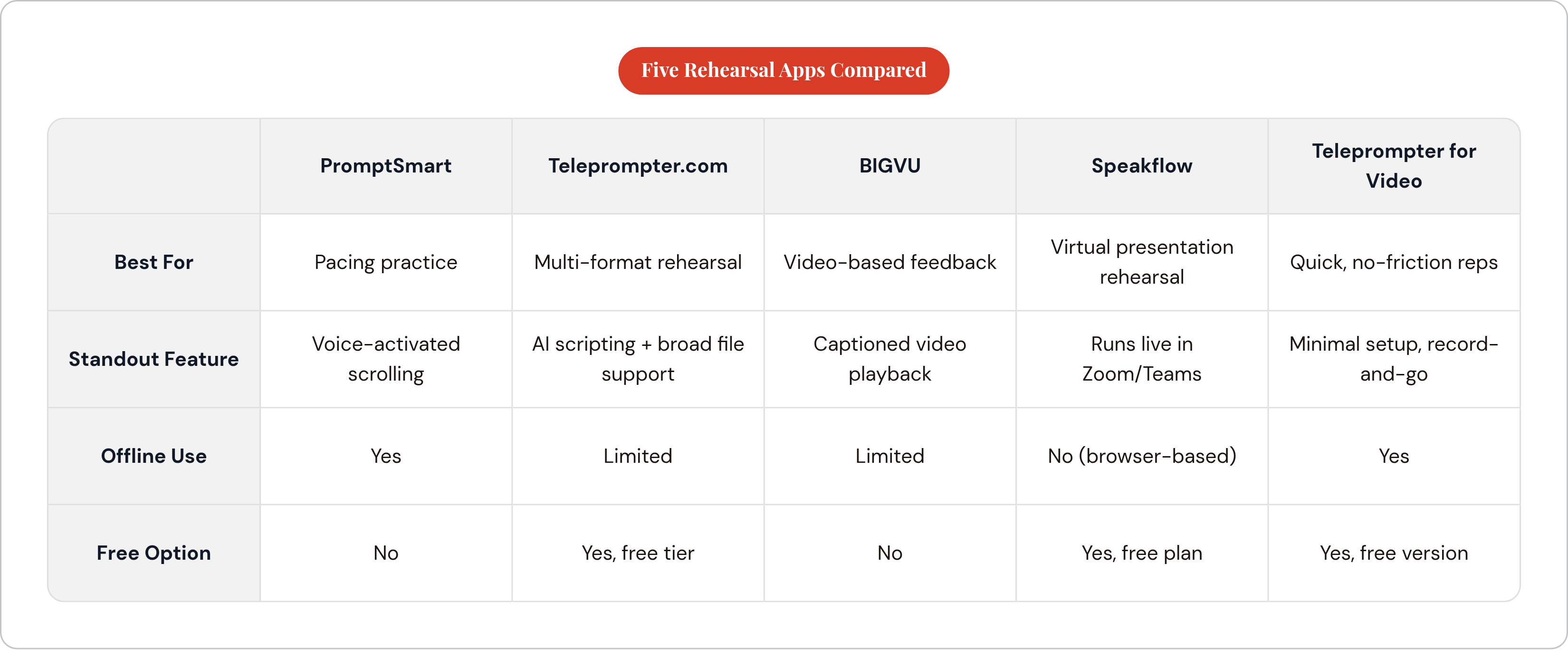
Ranked by rehearsal utility, not by how impressive the feature list looks on a landing page.
PromptSmart: Best for Pacing Practice
VoiceTrack is the most diagnostically useful feature in this category. The scroll follows your actual voice, not a timer you have to outrun. When you pause, improvise, or stumble, the scroll stops and waits.
PromptSmart works offline, handles multiple languages including English, Spanish, French, Mandarin, Japanese, and Hindi, and runs around a modest monthly fee. Speakers who rush under pressure, or who haven't located a natural cadence yet, may find this tool corrective rather than merely convenient.
Teleprompter.com: Best for Multi-Format Rehearsal
It earns its place through friction reduction. DOCX, PDF with OCR, TXT, RTF, Google Drive, Dropbox: the distance between a draft and an active rehearsal session is minimal. The AI scripting feature converts rough notes into speakable copy directly inside the app, which matters when you're practicing something not yet fully written. Accessibility features include Bionic Reading mode and an OpenDyslexic font option. Free tier available; paid plans start at a low rate billed annually.
BIGVU: Best for Video-Based Feedback
BIGVU pairs a teleprompter with video recording, automatic captions, and subtitle generation in a single workflow. The distinctive value: you can watch back a captioned recording of your own delivery immediately after a session. The gap between what you meant to say and what you actually said becomes audible and visible at the same time. Anyone producing recorded presentations or pitch videos who wants rehearsal and review in the same session will find this efficient.
Speakflow: Best for Virtual Presentation Rehearsal
Browser-based, no installation required, runs during live Zoom, Teams, or Skype calls. That specificity is the point: rehearsing remote presentations under realistic conditions, with the virtual background running, screen share active, and the prompter visible simultaneously. Free plan available; the Plus tier runs at a moderate monthly rate billed annually. Practicing in conditions that closely match the actual performance environment is a principle supported by skill transfer research in psychology. Speakflow is the only tool here built for that precise scenario.
Teleprompter for Video: Best for Quick, No-Friction Reps
Minimal setup time. The interface is built for a "record and go" workflow, and the free version handles short scripts without obstruction or upsell friction. When the tool disappears into the background and leaves only the delivery to think about, the barrier to daily reps drops substantially. Best for beginners and anyone who needs to be rolling in under two minutes.
Free and Open-Source Options for Rehearsing on Zero Budget
The tool is not the barrier. Avoiding every tool is.
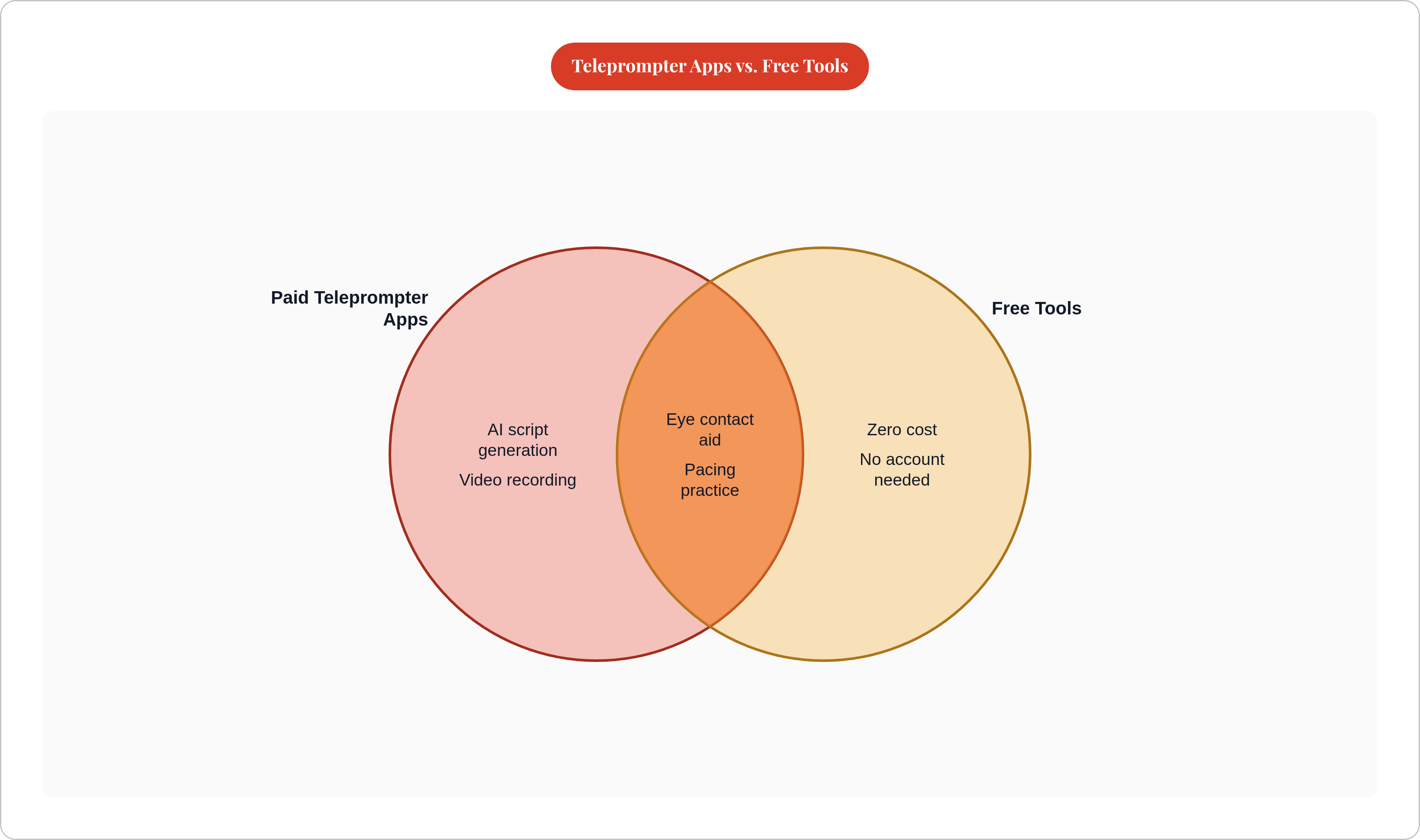
Three options for zero spend: Imaginary Teleprompter is free, open-source, and runs on Windows, Mac, and Linux with substantial customization and no artificial feature caps. CuePrompter is entirely web-based, requires no account, and works for basic rehearsal with essentially no friction. TeleprompterMirror.com functions as a Zoom prompter specifically, letting users read notes while maintaining direct eye contact on calls.
The tradeoff is real. Free tools don't offer voice-activated scrolling, AI scripting, or integrated video recording. They're appropriate for early-stage rehearsal, for getting comfortable with the practice itself before spending money on more capable tools. The hierarchy isn't free versus paid. It's using something versus using nothing.
What the Stakes Actually Look Like for People Who Don't Practice Verbal Delivery
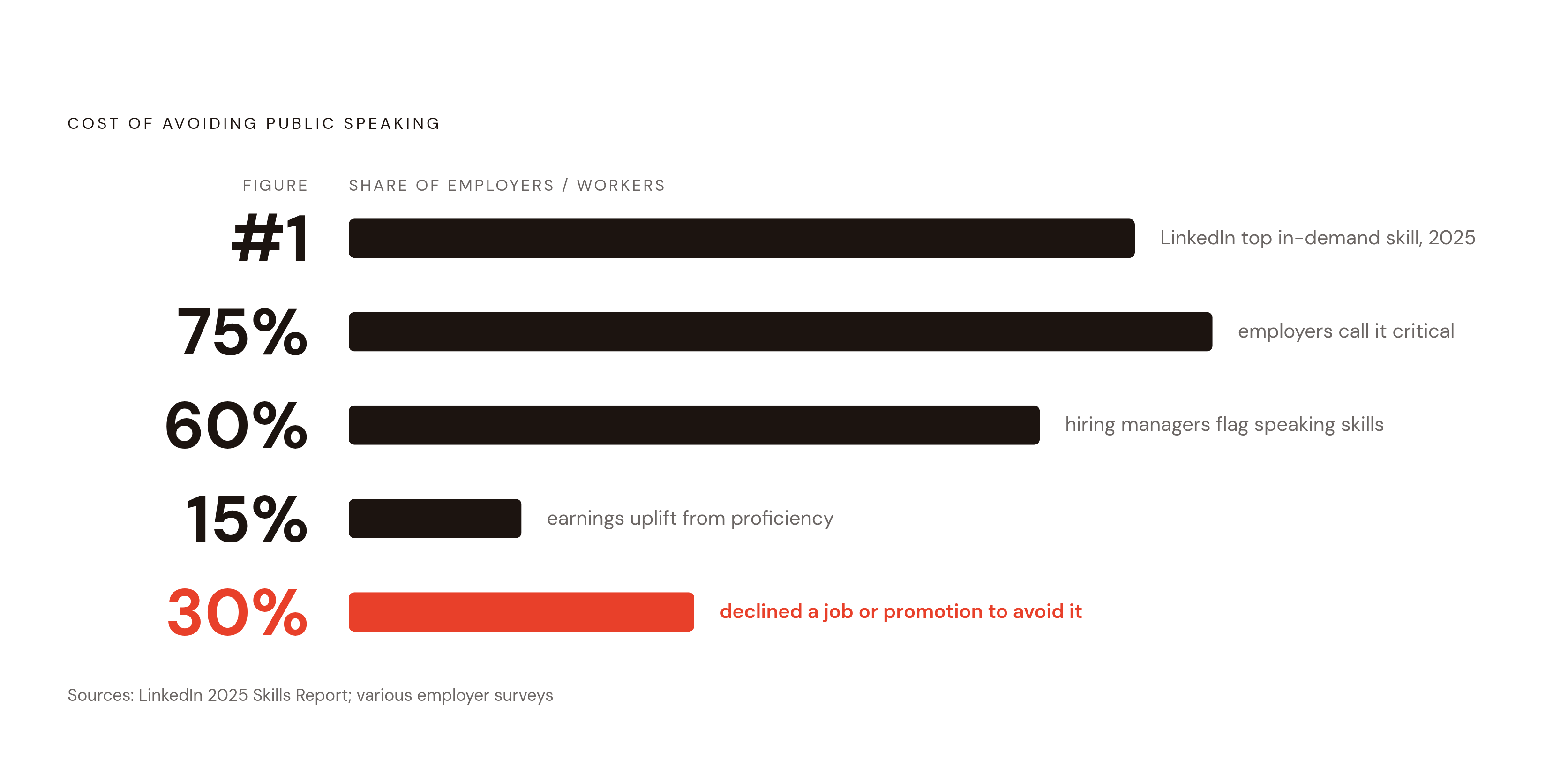
The stakes have a financial shape, and they are documented.
LinkedIn ranked communication as the most in-demand skill for the second consecutive year in its 2025 Workplace Learning Report. More than three-quarters of employers identify it as a critical hiring attribute, per the National Association of Colleges and Employers Job Outlook data for 2025; roughly 59 to 60% of hiring managers specifically flag public speaking as important for applicants. Some research has found correlations between public speaking proficiency and earnings differences in the range of 10 to 15%, though the causal mechanisms are not fully established. Approximately 30% of people report having declined a job or promotion specifically to avoid speaking in front of others, according to survey data cited by the National Institute of Mental Health.
The age gradient is instructive. Chapman University's Survey of American Fears found that younger adults report lower confidence in public speaking than older adults; among adults over 45, confidence levels are substantially higher. The gap closes with experience, which means it can be deliberately closed through practice rather than passively waited out. The education gradient tells a similar story: adults with higher levels of formal education report lower rates of significant fear of public speaking. The differentiating variable appears to be exposure and repetition, which happen to be exactly what a rehearsal protocol produces.
A Rehearsal Protocol That Turns Any of These Apps Into a Real Practice Tool
The protocol matters as much as the tool. An app used carelessly is just another way to feel productive without actually improving.
Write for speaking, not reading. Use spoken syntax. Spell out numbers. Build in pause markers. A script that reads cleanly on the page frequently sounds wooden spoken aloud; revise for the ear, not the eye.
In the first week, set the scroll speed slower than comfortable. The goal is to feel the rhythm of the material, not to demonstrate that you can keep pace with a timer. Pacing is a skill; it has to be practiced at a tempo slow enough to actually register.
Record every session and review at least one clip per day. The playback is where the learning lives.
Isolate variables across sessions. One session targets pacing. The next targets eye contact. The next targets vocal emphasis. Trying to fix everything simultaneously fixes nothing.
Progressively reduce script dependence. Start with the full script. Move to a bullet-point version. Then run the material with no prompter. The app is scaffolding; the whole point is to eventually remove it.
One gap this protocol doesn't close: scripted rehearsal builds command of prepared material. It does almost nothing for the improvisational confidence required during Q&A, unscripted conversation, or the moments when your prepared remarks go sideways. That's a separate skill, and it requires separate training. Some tools address this directly, giving users daily unscripted prompts and instant feedback to build real-time composure that teleprompter rehearsal cannot reach. The complete verbal skill stack requires both: structured script rehearsal for prepared delivery, and daily unscripted reps for everything the script doesn't cover.