PowerPoint Alternatives Worth Switching To
Five tools that solve what PowerPoint leaves broken.

"Death by PowerPoint" is a cliché because it keeps being true. Slides stuffed with bullet points and six-point footnotes don't inform an audience; they split its attention between reading and listening until neither works. The cognitive science is unambiguous: simultaneous text processing and verbal comprehension degrade both channels, and audience attention begins falling apart meaningfully around the thirty-minute mark, a structural reality that almost no standard deck is designed around.
The failure runs in both directions. For the audience, it's cognitive overload. For the creator, it's design friction. Building a visually coherent deck in PowerPoint requires genuine design skill and time most people don't have, so they settle for the defaults. The defaults are mediocre. Survey data consistently shows audiences expect visual-first slides, with text occupying a small fraction of each screen. The default PowerPoint template has never internalized this.
PowerPoint still holds roughly 86% of the corporate presentation market, per Statista's 2024 figures. That sounds like dominance, and it is, in roughly the same way a legacy mainframe still "dominates" a bank's back office: technically accurate, structurally entrenched, and increasingly beside the point for the teams doing actual work. The global presentation software market sat at USD 6.69 billion in 2024 and is projected to reach nearly USD 30 billion by 2033, growing at a compound annual rate of roughly 17.4%. That trajectory doesn't happen because every team we've surveyed is satisfied with what they already have.
In 2026, teams expect real-time collaboration, AI-assisted design, shareable web links, and interactivity as baseline features, not premium add-ons. PowerPoint delivers some of this via Microsoft Copilot. Not all of it, and not in ways that suit every team's workflow.
The practical implication: there is no single failure mode, so there is no single best alternative. Which tool you need depends entirely on which problem is most acute.
The free and familiar alternatives: Google Slides, Keynote, and LibreOffice Impress
Google Slides
Google Slides is the default for teams already inside Google Workspace, a platform with over one billion active users globally as of 2025. Its core value is real-time co-editing without friction: multiple contributors, one deck, no version-conflict nightmares. Live-linked Google Sheets charts update dynamically inside slides, which makes it genuinely useful when figures change between draft and final review.
The trade-offs are deliberate. The interface is minimalist, which lowers the learning curve but caps the ceiling: animations are basic, customization is limited, and no one has ever called a Google Slides deck beautiful. Version history and comment threads make it a reliable workhorse for distributed teams working asynchronously. The price is zero with a Google account.
Apple Keynote
Keynote is what you get when a hardware company builds presentation software and refuses to compromise on visual output. The "Magic Move" transition alone produces animations that feel materially smoother than anything PowerPoint generates by default. For designers, filmmakers, and marketers working entirely in the Apple ecosystem, Keynote offers pixel-level control that rewards the investment.
The constraint is non-negotiable: macOS and iOS only. Mixed-OS teams can't use it as a shared tool, which makes it a personal professional asset rather than an organizational one. Free for Apple device users.
LibreOffice Impress
LibreOffice Impress exists to solve exactly one problem: maximum PowerPoint compatibility at zero cost. It imports.pptx files reliably, handles Keynote files, and includes hundreds of downloadable templates. For individuals and small organizations that need a functional presentation tool without a Microsoft 365 subscription, it is a perfectly serviceable answer.
What it isn't: modern. No cloud collaboration, no AI assistance, and an interface that communicates loudly that it was designed in an era before design mattered to software products. It works. It is not interesting.
When design quality is the priority: Canva and Beautiful.ai
Canva
Canva has cleared 190 million monthly users as of 2025, with presentations ranking as the second-most created content type on the platform after social media graphics. The value is straightforward: non-designers produce polished output fast. More than 250,000 presentation templates, a drag-and-drop interface, and a near-zero learning curve mean a recruiter, a small business owner, or a marketing coordinator can build something that looks professional without involving someone with a design degree.
Worth stating plainly: Canva is a general-purpose design tool. Its AI-generated slide content produces outline-level scaffolding, not substantive narrative. Use it for visual polish; don't expect it to write your argument for you. Pricing as of Q2 2026: a free tier with limited AI, Pro at $12 per month or $120 annually, Teams at $10 per user per month with a three-user minimum.
Beautiful.ai
Beautiful.ai solves a different version of the same problem. Where Canva gives non-designers creative freedom, Beautiful.ai removes most of that freedom in exchange for enforced consistency. Its Smart Slides system makes layout decisions automatically, keeping the deck within a defined design system even when multiple contributors build different sections simultaneously. The output stays coherent. That is the product.
The March 2026 "Context-Aware AI Workflow" release is notable: it requires the AI to produce a reviewed text outline before designing any slides, which keeps narrative logic in human hands before the visual layer is committed. Sales teams and client-facing organizations that need web-shareable links and brand-consistent output at scale will find this model maps to how they actually work.
Canva is for expressive flexibility; Beautiful.ai is for systematic control. The choice depends on whether your problem is insufficient creative output or insufficient creative discipline.
When the audience needs to participate: Prezi and Mentimeter
Prezi
Prezi's defining feature is structural, not cosmetic. Its non-linear, zoomable canvas lets a presenter pull back to a full conceptual map, dive into a specific detail, then resurface to show how that detail connects to the whole. PowerPoint's sequential format cannot do this. For educators, trainers, and conference speakers whose core task is showing how ideas relate rather than delivering a linear report, the format difference is substantive, not cosmetic. Prezi's own education data indicates institutions have reported meaningfully higher audience recall using non-linear presentation flows.
The limitation is equally structural. The canvas format makes presenting organized financial data, tables, or sequential process documentation genuinely awkward. This is the wrong tool for a quarterly earnings review or a compliance training checklist. A free plan is available; paid plans start at $5 per month billed annually.
Mentimeter
Mentimeter is less a slide tool and more an audience-response layer that wraps around any presentation. Live polls, quizzes, and word clouds turn one-directional delivery into a two-way exchange; the audience responds on their phones in real time, and results display live on screen. Research from the University of Reading found that Mentimeter improved student retention by encouraging active application and critical thinking rather than passive listening.
Facilitators, HR teams, and educators presenting to groups where real-time input is part of the session's design will find the premium justified. Paid plans start at $143.88 per year per user, with educator discounts available. Mentimeter is also frequently deployed alongside another tool rather than as a standalone replacement, augmenting an existing deck rather than substituting for one.
When collaboration and workflow are the bottleneck: Pitch and Visme
Pitch
Pitch is built for remote-first teams where building a deck involves many contributors across time zones and the presentation itself is a deliverable with real organizational stakes. Its asynchronous collaboration features are the standout: contributors can leave comments and record short video responses directly inside slides, and an AI summarizer surfaces key discussion points automatically. Built-in approval workflows and version control push it closer to a content operations tool than a conventional slide application.
The aesthetic skews modern and minimal, with templates calibrated toward startup and VC presentation norms. Every startup I know building investor decks, performance reviews, and client-facing materials across multiple contributors finds that Pitch reduces the coordination overhead that typically turns a two-hour project into a two-week one.
Visme
Visme has the broadest definition of what a "presentation" is. Native integrations with HubSpot and Salesforce connect it to the sales and marketing stack. Support for SCORM, xAPI, and HTML export formats makes it compatible with learning management systems, which no other tool covered here can claim. A presentation built in Visme can end its life as a live talk, a microsite, an embedded marketing asset, or a formal training module.
The full AI suite, covering presentation generation, image generation, text generation, and video editing, positions Visme as a content platform that includes presentations rather than a presentation tool that added some features. Marketing teams and learning-and-development departments with complex, multi-channel content needs will find the scope appropriate. Teams that just need to share a slide deck will find it considerably more than they asked for.
How AI has changed what's possible in 2025–2026 (and what it still can't do)
Enterprise user feedback is consistent: AI presentation tools cut deck-building time by 50 to 80 percent compared to manual workflows. That efficiency gain is real. The more important question is what gets built in the time that's left.
Gamma is currently the dominant AI-native tool in the space, having passed 70 million users and $100 million in annual recurring revenue as of November 2025. Its workflow is the right model: editable text outline first, slides second. The human reviews and approves the narrative logic before the AI commits to a visual design. Authorial control stays where it belongs.
Google NotebookLM added slide generation in November 2025 and remains completely free. Its differentiating feature is that it generates from the user's own source documents, which makes content accuracy materially better than tools generating from generic prompts. When accuracy matters and budget is constrained, this is the one worth knowing.
Microsoft Copilot inside PowerPoint generates draft presentations, translates into 40 languages, assists with speaker notes, and now supports GPT-5.4 in Agent Mode, making it the most capable AI layer available in a presentation tool. It is locked behind a Microsoft 365 subscription at $21 per user per month, with a promotional rate of $18 per user per month at time of writing. For organizations already paying that subscription, the capability is already included.
One data point the market hasn't fully absorbed: Tome was on every credible "best AI presentation tool" list through most of 2024, with 20 million users. It shut down its Slides feature in April 2025 and pivoted to a CRM product. Articles published before that date still recommend it. Those recommendations are wrong. The AI presentation tool landscape moves fast enough that any list older than twelve months should be verified before acting on it.
The accuracy problem is what most marketing copy conveniently omits. With the exception of NotebookLM, which draws from user-supplied documents, every AI presentation tool is capable of introducing fabricated statistics, incorrect attributions, and hallucinated data directly into slides. Any slide containing a specific number requires manual verification before the deck reaches an audience. AI handles structure and visual design. It does not handle truth. The presenter is still accountable for every claim on every slide.
How to match the right tool to your actual situation
Start with the failure mode, not the feature list.
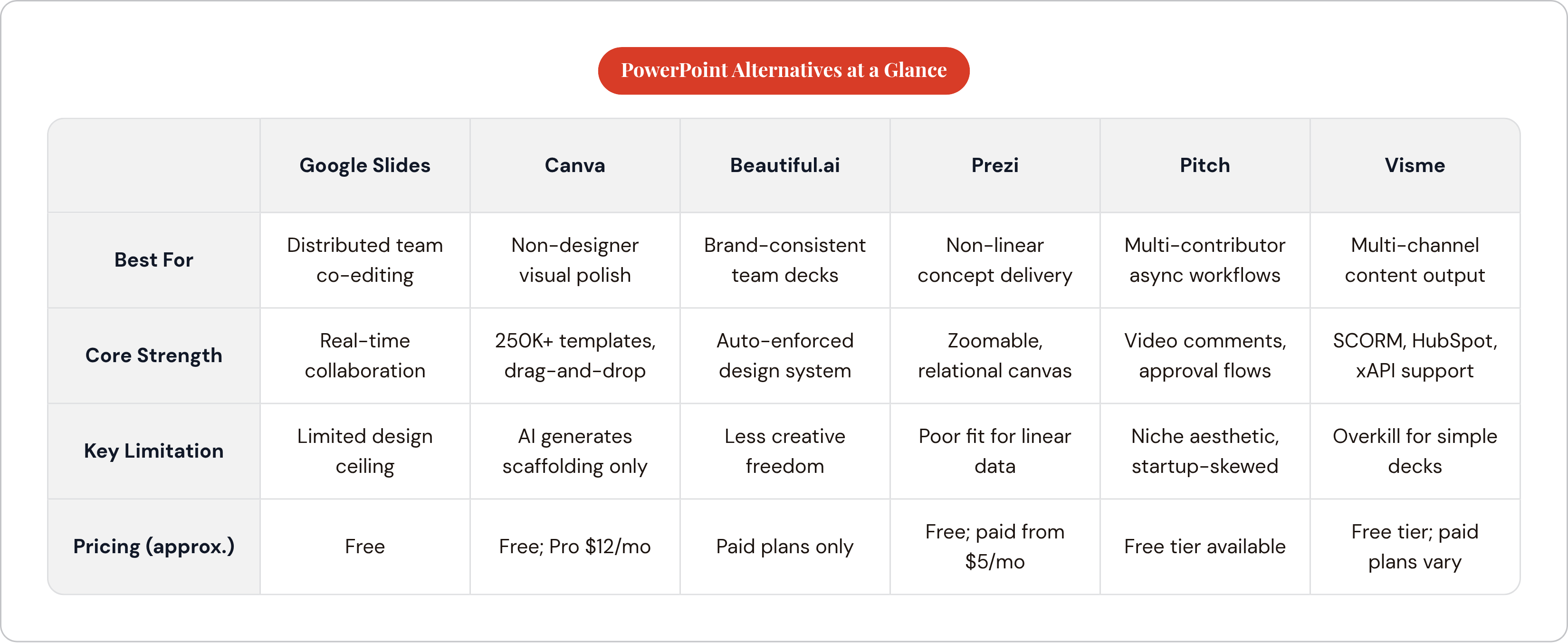
If slides look generic or amateur, Canva offers maximum creative flexibility; Beautiful.ai enforces brand consistency when discipline is the real problem. If the audience disengages during delivery, Prezi's non-linear structure changes the format at the root, or Mentimeter adds live participation on top of whatever format you already use. If building decks takes too long or involves too many contributors, Pitch's async collaboration or Gamma's AI-first generation addresses the bottleneck directly. If presentations need to survive as web assets, training modules, or embeddable content, Visme is the only tool on this list built for that output. If the goal is simply to reduce the Microsoft licensing bill, Google Slides or LibreOffice Impress do exactly that, without ceremony.
Ecosystem and budget constraints narrow the field further. Teams already inside Google Workspace have a zero-friction default in Google Slides. Apple-only creative teams have Keynote. Organizations already paying for Microsoft 365 should honestly evaluate whether Copilot in PowerPoint delivers enough improvement to make switching unnecessary before paying for something else. Teams with no budget have Google Slides, Keynote on Mac, LibreOffice Impress, Google NotebookLM, and Gamma's free tier, collectively a more capable set of free tools than has ever existed.
Audience and delivery format close the decision. Live room or stage delivery favors Prezi or Keynote for visual impact, with Mentimeter added when interaction is part of the session design rather than an afterthought. Asynchronous review, investor decks, and multi-stakeholder approvals favor Pitch or Visme, where embedded commenting and version control do real work. Internal team updates favor speed over polish: Google Slides or Canva, built quickly, shared instantly.
The switching cost question deserves a direct answer. Migrating templates and retraining a team carries real overhead, and switching for novelty is expensive. Switching to solve an identifiable, recurring problem is a straightforward return-on-investment calculation. Those are different decisions, and conflating them is how teams end up paying for tools they don't use.
One thing worth naming before closing: none of these tools make the presenter better. They make the slides better. If the gap is in delivery, verbal fluency, or the ability to handle a hard question without retreating to a bullet point, that is a separate problem entirely, and no template ships with a solution for it.